How to Build an Indoor Playground Website with AI: A Custom CMS Theme, Start to Finish

How to Use AI for Indoor Playground Market Research and Website Builds
October 28, 2026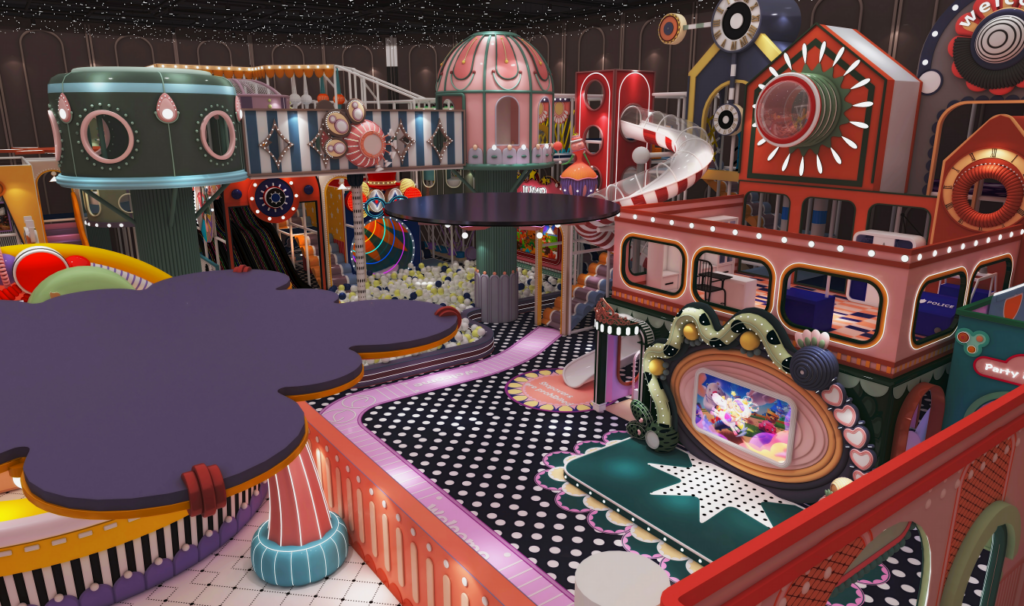
Using HappyWiz indoor playgroud at Marine Parade as the worked example. Covers content modelling for zone-based venues, theme architecture, and the Markdown configuration that makes an AI build repeatable. All samples are copy-paste ready.
1. Why build a theme instead of assembling pages
Most small venue websites in Singapore are built the same way: a stock theme, a page builder, and a developer dragging blocks until the homepage looks acceptable. It ships fast and it works, for a while.
The problems surface later, and they are structural rather than cosmetic.
Page-builder sites store content and presentation in the same place. A play zone’s description, its age range, its photo and its layout all live inside one page’s markup. Which means the age range cannot be displayed anywhere else — not in a filtered list, not in a comparison table, not in structured data for search engines — without being retyped. When the venue adds a zone, someone duplicates a page and edits it, and the duplicate inherits whatever was wrong with the original.
A custom theme separates the two. Content lives in defined fields; the theme decides how fields are displayed. Age range becomes a value that can appear on the zone page, in the overview grid, in a filter, and in structured data, from one source.
The reason this matters more for a playground than for, say, a restaurant, is the filtering behaviour of the audience. Parents do not browse a playground site. They check two or three things — is my child’s age catered for, how much is it, can I do a party there — and leave. A site where those answers are locked inside page content cannot surface them quickly.
Building a theme is not about making the site look better. It is about making the facts about the venue addressable.
2. Reading the venue before modelling it
The content model has to come from how the venue is actually organised, not from a template.
HappyWiz occupies the fourth floor of a mall at Marine Parade Central. Published coverage describes high ceilings and an open plan, with the floor divided by age: toddler-oriented areas to one side of the entrance, older children’s areas to the other. The attractions include a pellet pit with a short slide, a central obstacle course and climbing maze, a spread of slides at different heights including a four-lane slide, a light-up building-block wall, several role-play zones (a mini farm with milking and egg-collecting, a car repair workshop, a supermarket), and a trampoline section with interactive screens. Admission runs from $28 for one hour to $48 for three hours, with each ticket covering one child plus one accompanying adult. A cordoned party area can be themed.
That description contains the entire content model, if read carefully.
2.1 Zone-based venues model differently from attraction-list venues
This is the distinction that determines everything downstream.
Some venues are a list of discrete attractions — a bowling lane, a VR rig, an archery range. Each is a separate thing a visitor queues for, plays, and leaves. Each deserves its own page, because each has its own search demand and its own specifications.
HappyWiz is a set of continuous zones. Children flow between the obstacle course, the slides and the supermarket without queuing or stopping. Nobody searches for “indoor obstacle course Marine Parade” as a destination in itself. Giving each zone a standalone page would produce thin pages competing for nothing.
The correct model for a zone-based venue is fewer, richer pages, with the zones as structured entries inside them:
/                          home

/play                      all zones, grouped by age suitability

/play/toddlers             zones suitable for under-3s

/play/preschool            zones for 3-6

/play/older-kids           zones for 6+

/pricing                   admission tiers

/parties                   party bookings

/visit                     location, hours, rules, FAQ
Zones are a content type that does not have its own URLs. They are assembled into the age-grouped pages. One zone can appear under multiple age groups — the four-lane slide suits a wide span, the pellet pit does not.
The grouping is by age, not by zone type, because age is how parents filter. A parent with a two-year-old and a six-year-old needs to know what each child can do. A list organised by “soft play / role play / active play” does not answer that; a list organised by age does.
2.2 The fields that fall out of the description
| Field | Why it exists |
|---|---|
name |
Display name |
age_min / age_max |
Drives the age grouping and any filtering |
supervision |
Whether an adult needs to be in the zone |
intensity |
quiet / moderate / active — parents of napping toddlers care |
gets_messy |
The farm involves water; parents want warning |
accessible_to_adults |
The tunnels fit adults; this is a selling point |
caution |
Pellet pit stings older children; slides are fast |
summary |
One line for the grid |
body |
80–150 words for the detail panel |
That caution field is unusual and worth keeping. Published coverage of the venue mentions both the pellet-pit issue and slide speed — which means parents are already encountering these and writing about them. A site that states them first reads as honest rather than as a warning. A site that omits them lets third parties frame them.
3. Theme architecture
3.1 Directory structure
A theme for a venue of this size needs very little. Resist the instinct to scaffold.
theme/

├── templates/

│   ├── base.html              shell: head, nav, footer

│   ├── home.html

│   ├── play-group.html        one age group, lists its zones

│   ├── pricing.html

│   ├── parties.html

│   └── visit.html

├── partials/

│   ├── zone-card.html         grid item

│   ├── zone-detail.html       expanded panel

│   ├── price-tier.html

│   ├── age-badge.html

│   └── cta-band.html

├── content-types/

│   ├── zone.json              field definitions

│   ├── price-tier.json

│   └── party-package.json

├── assets/

│   ├── theme.css

│   └── theme.js

└── THEME.md                   conventions, read by the build tool
The content-types/ directory is the part that distinguishes this from a page-builder build. Field definitions live in version control, which means the structure is reviewable and reproducible rather than existing only in a CMS admin screen that nobody has documented.
3.2 One content type, defined once
content-types/zone.json
{

"name": "zone",

"label": "Play Zone",

"has_own_url": false,

"fields": [

{ "key": "name",        "type": "text",   "required": true, "max": 40 },

{ "key": "summary",     "type": "text",   "required": true, "max": 90 },

{ "key": "body",        "type": "richtext", "required": true,

"help": "80-150 words. Open with what it physically is." },

{ "key": "age_min",     "type": "integer", "required": true },

{ "key": "age_max",     "type": "integer", "required": false,

"help": "Leave empty if there is no upper limit." },

{ "key": "intensity",   "type": "select", "required": true,

"options": ["quiet", "moderate", "active"] },

{ "key": "supervision", "type": "select", "required": true,

"options": ["adult required", "adult recommended", "independent"] },

{ "key": "gets_messy",  "type": "boolean", "default": false },

{ "key": "adult_sized", "type": "boolean", "default": false,

"help": "Can an adult physically accompany a child inside?" },

{ "key": "caution",     "type": "text", "required": false, "max": 120,

"help": "Anything a parent should know before their child goes in." },

{ "key": "image",       "type": "image", "required": true,

"help": "Alt text must describe the activity and include 'indoor playground'." }

]

}
4. THEME.md: the conventions file
The build tool reads a conventions file at the start of every session and keeps it in context throughout. Keep it under about 200 lines — longer files consume context and instruction adherence drops. Reference material needed only occasionally belongs in skills, loaded on demand.
For a theme build, this file carries everything that must hold across every template.
THEME.md
# HappyWiz ThemeCustom CMS theme. Zone-based venue — zones are components, not pages.
– `npm run dev` — local with sample content
– `npm run build` — production bundle
– `npm run check` — template lint + field validation
– Zones have NO standalone URLs. They assemble into /play/{age-group}.
– A zone may appear under more than one age group.
– Age grouping is the primary navigation. Not zone type.
– Every field in content-types/ must be rendered somewhere or removed.
– Every template extends base.html. No standalone HTML documents.
– Markup goes in partials when used twice. Not before.
– No inline styles. All styling in theme.css via custom properties.
– Never display age_max when empty. Render “6+” not “6-null”.
– Always render `caution` when present, styled as information not warning.
– `supervision` renders as a badge on the card, full text on the panel.
– Price figures come from the price-tier content type. Never hardcode
a price in a template or a string.
– Design mobile-first. Majority of visits are phones.
– Age group switcher must be reachable without scrolling on a 375px viewport.
– Zone grid: 1 column under 600px, 2 under 900px, 3 above.
– No horizontal scroll at any width. Test at 320px.
– Largest Contentful Paint under 2.0s on 4G
– Total JS under 40KB compressed
– Every image lazy-loaded below the fold, explicit width/height always
– Never hardcode a price, an opening hour, or a phone number in markup.
– Never ship a zone without age_min — the age grouping breaks silently.
– Never add a JS dependency for something CSS can do.
– Never invent venue facts. Unknown field, write TODO, do not fill it.
5. Skills: the repeatable parts of the build
A skill is a Markdown file containing a workflow. Skills load on demand — invoked with a slash command, or picked up automatically when the task matches the skill’s description. Unlike the conventions file, which loads in full every session, only a skill’s description occupies context until it is actually used.
That makes skills right for anything that runs occasionally: adding a zone, auditing templates, pre-launch checks.
5.1 Adding a zone
.claude/skills/new-zone/SKILL.md
markdown
—
name: new-zone
description: Add a play zone to the venue site. Use when the venue
adds equipment, reopens a refurbished area, or a zone was missed
in the initial build.
—
# New Play Zone
## Gather first — do not guess
1. What is it physically? Equipment, surface, approximate size.
2. Youngest age it suits, and what limits it (height, strength, risk).
3. Oldest age that still enjoys it. Empty if none.
4. Can an adult go in with the child?
5. Does it involve water, sand, pellets, or anything that gets on clothes?
6. Is there anything a parent should be warned about before
their child goes in?
7. Which age groups should it appear under? May be more than one.
Any unknown answer becomes `TODO` in the field. Do not infer it from
a photograph. Do not infer it from similar zones at other venues.
## Build steps
1. Read an existing zone entry as the format reference.
2. Create the zone entry with every field from content-types/zone.json.
3. Register it under each applicable age group.
4. Run `npm run check` — field validation must pass clean.
5. Run `npm run dev` and view the zone card at 375px, 768px, 1280px.
## Writing the body
Open with what it physically is. Not with how fun it is.
Good: “A padded maze of ramps, rollers and hanging obstacles,
with tunnels wide enough for an adult to follow a child through.”
Bad: “An exciting adventure that will keep kids entertained for hours!”
80-150 words. Cover, in order:
– what it is physically
– how children typically use it
– who it suits and any practical note (clothing, timing, supervision)
## Before finishing
– [ ] age_min present and justified by a physical reason
– [ ] age_max empty rather than guessed, if there is no real limit
– [ ] caution field filled if anything in the gathering step flagged one
– [ ] image alt text describes the activity, contains “indoor playground”
– [ ] Zone card renders without overflow at 320px
– [ ] No TODO left unflagged in the handover note
5.2 Auditing the theme
.claude/skills/audit-theme/SKILL.md
markdown
—
name: audit-theme
description: Audit templates and content against THEME.md conventions.
Run before launch, after bulk content entry, and after any
template refactor.
—
# Theme Audit
Report violations. Do not fix. Do not rewrite.
## Content checks
Read every zone entry:
| Check | Fail condition |
|—|—|
| age_min | missing |
| age_max | present but lower than age_min |
| summary | over 90 chars |
| body | outside 80-150 words |
| image alt | missing, or does not contain “indoor playground” |
| TODO | any field still marked TODO |
| Orphan | zone not registered under any age group |
## Template checks
| Check | Fail condition |
|—|—|
| Hardcoded price | a currency figure appears in any template or partial |
| Hardcoded hours | a time range appears in any template or partial |
| Inline style | a `style=` attribute anywhere |
| Unused field | a field in content-types/ rendered by no template |
| Standalone doc | a template not extending base.html |
| Unextended partial | a partial used exactly once |
## Output
One table per section, sorted worst first. Then a single line:
how many of the issues are template-level versus content-level.
Do not edit any file.
That closing line does real work. Nineteen content errors across twenty zones is almost never twenty mistakes — it is one template or one field definition that made the mistake easy. An audit that says “17 of 23 issues are template-level” points at the fix. An audit that silently repairs twenty-three entries hides it, and the twenty-fourth zone will have the same problem.
6. The parts of the build AI handles badly
6.1 Booking integration
Every playground site ends at the same place: a ticket purchase. Most venues use an external ticketing or booking provider, and the integration is where builds go wrong.
The reason is that booking flows carry money and personal data, and their failure modes are silent. A date picker that offers slots the venue does not actually run, a party enquiry form that submits to an address nobody monitors, a price that renders from a cached value after the venue has changed it — all of these look fine in a browser and cost real bookings.
The division that works: AI builds the structure, humans verify the behaviour against live systems. The embed markup, the responsive container, the fallback when the provider’s script fails to load, the loading state — all mechanical, all suited to automation. Whether the slots shown are the slots sold, whether the confirmation email arrives, whether the price matches the till — those get tested by a person placing a real booking.
6.2 Photography and claims about the venue
Theme work tempts an AI into writing placeholder copy that reads as real. “Over 20 play zones across 10,000 square feet” is a plausible sentence and an invented fact.
The rule in the conventions file — unknown field, write TODO — handles this if it is enforced. The audit skill’s TODO check is what enforces it. Without the audit, placeholders written during the build survive to launch, because placeholder text that reads naturally is invisible during review.
6.3 Safety and compliance content
Playground sites carry rules: socks required, height limits, supervision requirements, what happens if a child is unwell, liability wording on waivers.
None of this should be drafted by a tool. Supervision ratios and liability language are operational and legal decisions specific to the venue and its insurer. The build’s job is to create a place for that content and render it clearly. The content comes from the operator.
Suited to AI Must stay with people
Template and partial construction Booking flow verification against live systems
Field schema from a venue brief Safety rules, supervision ratios, liability wording
Responsive behaviour and breakpoints Any claim about size, capacity or zone count
Accessibility and performance auditing Final pricing displayed to customers
Flagging unverified facts as TODO Deciding what is acceptable risk in a play zone
7. What makes the difference
The temptation in an AI-assisted build is to start with the homepage, because the homepage is what the client wants to see. That produces a site built outward from a hero image, with the content model improvised to fit whatever the homepage ended up needing.
The order that works is the reverse. Read the venue. Decide whether it is a list of attractions or a set of zones, because that single decision determines the URL structure. Write the field definitions. Write the conventions file. Then build templates against a model that already exists.
Once the model is explicit — every zone has an age floor, an intensity, a supervision level, a body of 80 to 150 words — the templates become mechanical, and mechanical work is what these tools are for.
The alternative is twenty zones entered by hand into a page builder, each slightly different from the last, with the age ranges locked inside the prose where nothing can read them.
Case venue: HappyWiz, iMall #04-01, Marine Parade Central, Singapore 449410. Admission from $28 (1 hour) to $48 (3 hours), each ticket covering one child and one accompanying adult. Open 10am–8pm weekdays, 10am–9pm weekends and public holidays.